
If you are an operator of trade or business (T:mi), an agricultural/forestry operator, select Manage your tax matters in MyTax. When you start with Manage your tax matters, you can access all your tax affairs. Read more: New in MyTax
How to report income from crypto assets and virtual currencies in MyTax
You can receive income from selling, exchanging, spending or mining crypto assets.
You can report the income for your current year’s tax card, or you can request prepayments if, for example, you sell a lot of crypto assets at once. You must file the income and deductions on the pre-completed tax return at the latest.
Contents:
A. Selling, exchanging or spending crypto assets
Attention begins.
New obligation to provide information on crypto asset services in 2026
Starting in tax year 2026, the Tax Administration will receive increasingly extensive information on trading in crypto assets. Information will be collected widely from both abroad and Finland, and international exchange of information will intensify. Read more about the obligation to provide information.
Attention ends
A. Selling, exchanging or spending crypto assets
Selling means that you exchange crypto assets for other crypto assets or for official currency (such as euros) or that you spend them on purchases or pay invoices with them.
Go to MyTax and log in (opens in a new window)
First select whether you file the information for your tax return or tax card
In MyTax, you can file sales transactions regarding crypto assets
a) one by one
b) for the whole year at once.
If you report sales transactions for the whole year at once, note the following:
- Add a separate calculation of capital gains as an attachment file, itemising all the sales transactions for the year.
- You can prepare the calculation using the Tax Administration’s FIFO calculator if you want. The calculator is available in Finnish and Swedish. If you use the Tax Administration’s FIFO calculator, make a separate calculation for each type of crypto asset you have sold. If you have Bitcoins and Litecoins, for example, make two separate calculations.
- If your sales transactions in the tax year generated both gains and losses, you must not only add the attachment file but also enter two separate calculations of capital gains in MyTax: one on the sales that generated gains and the other on the sales that generated losses. As a result, losses can be deducted from gains in the correct order. Do as follows:
- Separate between the sales that generated gains and the sales that generated losses in the calculation you saved as an attachment. If you use the Tax Administration’s FIFO calculator, you can see the transactions that generated gains and those that generated losses at the top left corner of the table once the calculation has been completed.
- In MyTax, first enter the calculation on sales that generated gains. Here you can report the sales of different crypto assets that generated gains all together (in other words, you do not need to provide separate itemisations for Bitcoins and Litecoins, for example).
- Next, select Add new transfer and enter the calculation on sales that generated losses.
Go to Capital gains on the tax return
-
In the Individual income tax section, go to Pre-completed tax return 2025 and select the link Check your pre-completed tax return.
-
Select Make corrections to the pre-completed tax return.
-
In the Background stage, you can see your own details.
-
Proceed to the Pre-completed income and deductions stage. If you have previously reported details on crypto asset sales, you can see them in this stage under Capital income. If so, you can make corrections or report new sales transactions in this stage.
-
If no information on crypto asset transfers or other transfers is shown in the Pre-completed income and deductions stage, proceed to the Other income stage. Scroll down to Capital income.
-
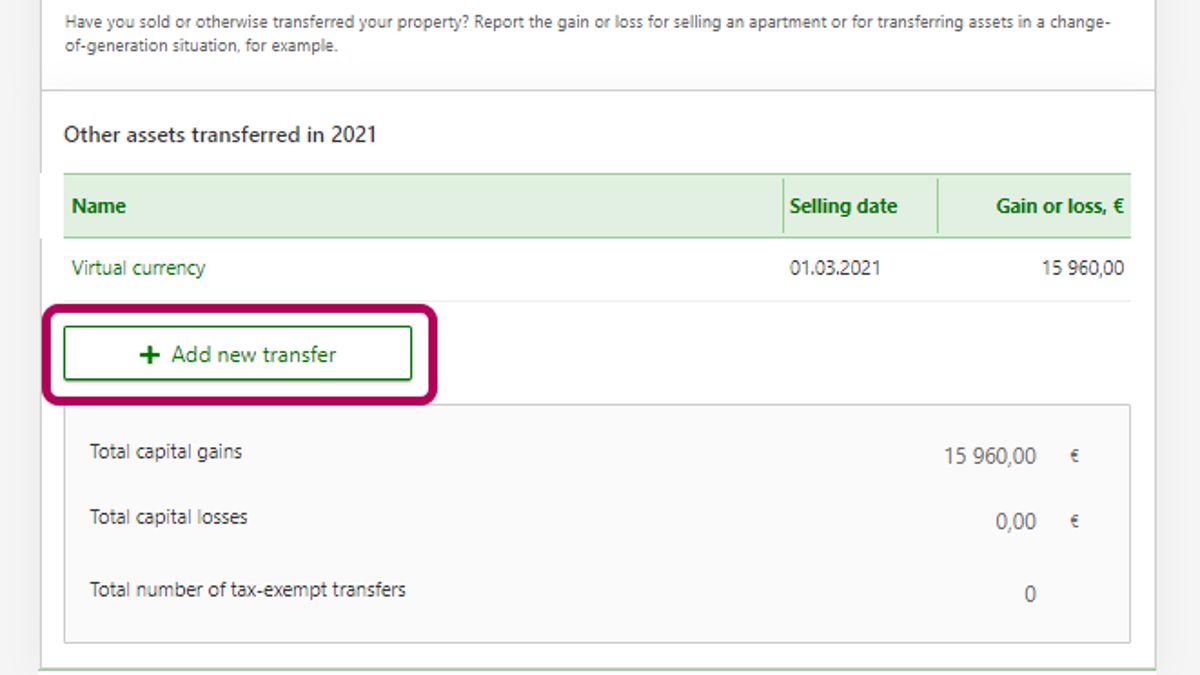
Select Yes at Capital gains. Then select Add new transfer.
-
Select Crypto assets and enter the names of the crypto assets.
File details on the sales transactions
-
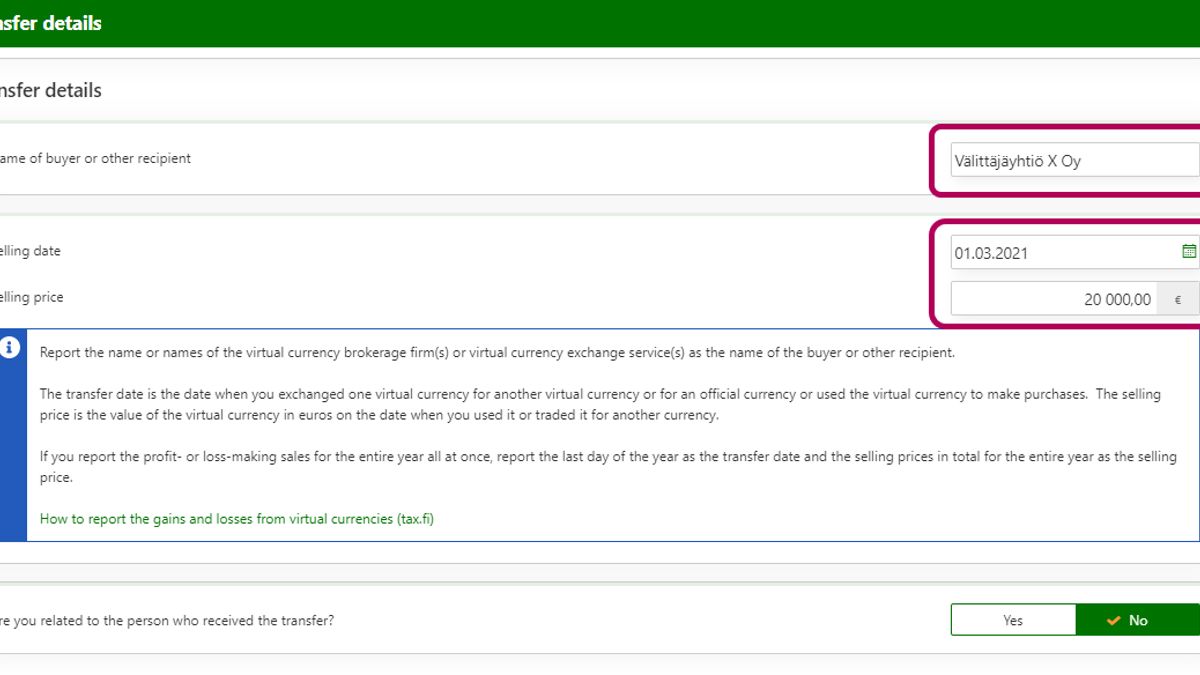
Give the name or names of the virtual currency brokerage firm(s) under Name of buyer or other recipient.
a) When you report a single sales transaction
- The selling date is the date when you exchanged crypto assets for other crypto assets or for official currency or spent them on purchases.
- The selling price is the value of the crypto assets in euros on the date when you spent them or exchanged them for other currency.
b) When you report sales transactions for the whole year at once
If you file the sales of crypto assets for the whole year at once, enter the following details in this section:
- The selling date is the last day of the year, for example 31 December 2025.
- The selling price is the whole year’s selling prices in total (separate itemisations of the selling prices for the transactions that generated gains and for those that generated losses).
-
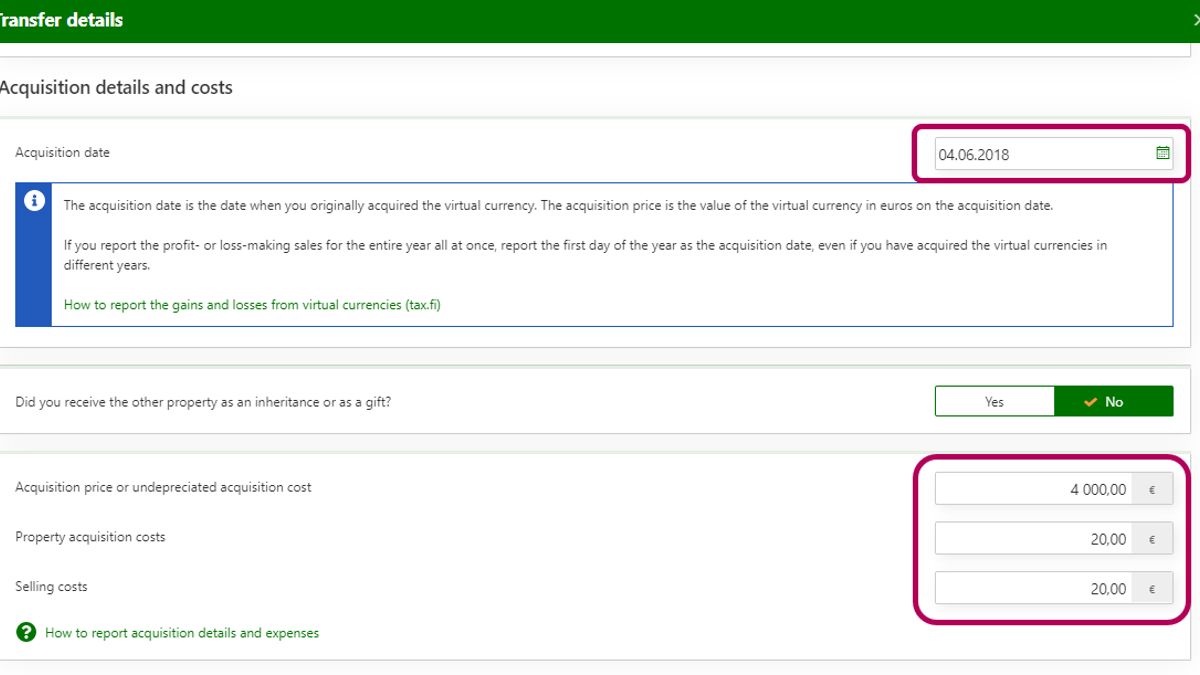
Go to Acquisition details and costs.
a) When you report a single sales transaction
- The acquisition date is the day when you originally acquired the crypto assets.
- The acquisition price is the value of the crypto assets in euros on the acquisition date.
- Also report any expenses caused by the acquisition and selling of crypto assets.
b) When you report acquisition details on the whole year’s sales transactions
When you report acquisition details on the whole year’s sales transactions, enter the following information in this section:
- The acquisition date is the first day of the year, such as 1 January 2025, even if you acquired the assets at different times over several years.
- The acquisition price is the acquisition prices of all the crypto assets you have sold during the year added together (separate itemisations of the acquisition prices for the transactions that generated gains and for those that generated losses).
- Enter your expenses for the acquisition of crypto assets, such as the broker’s fees in total. Also file the total selling expenses for the entire year.
-
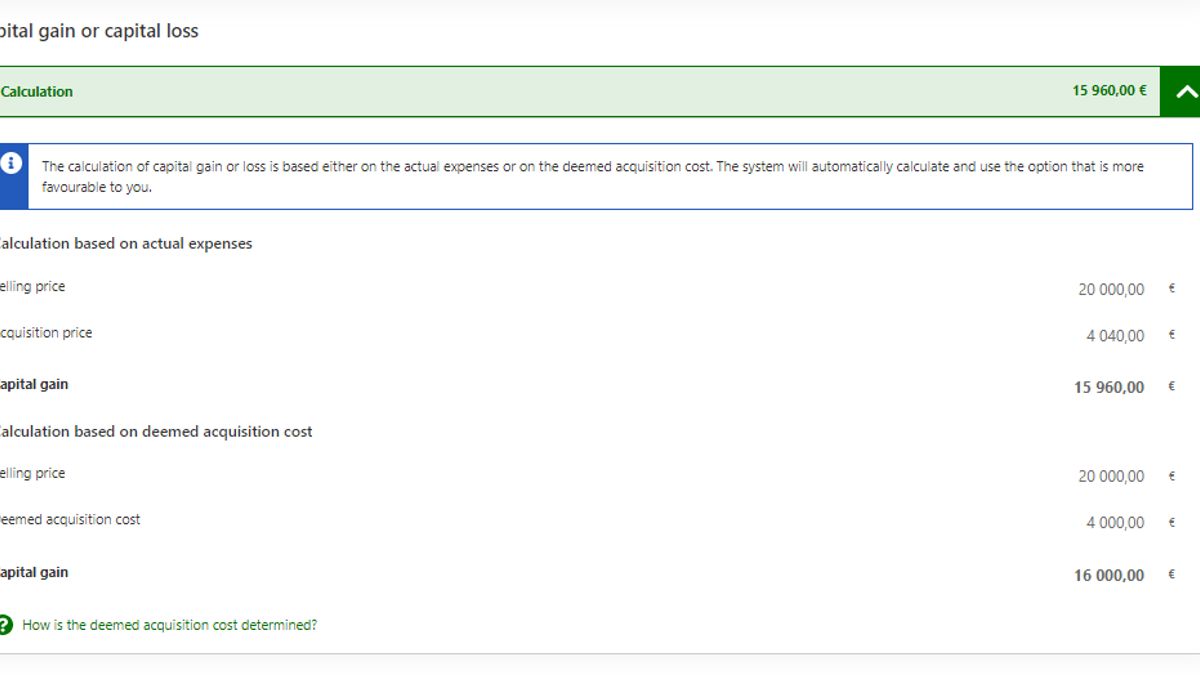
The calculation at Capital gain or capital loss shows the amount of capital gain calculated based on the actual expenses and based on the deemed acquisition cost. The system will automatically apply the alternative that is to your benefit.
-
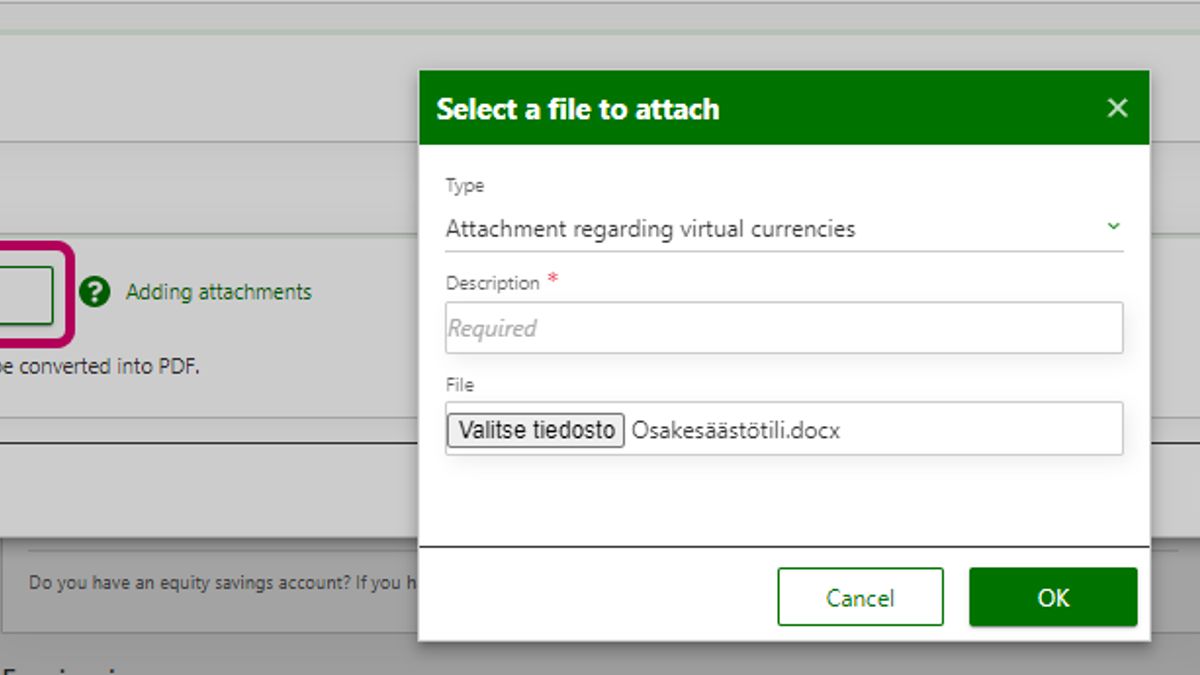
In the Attachments section at the end of the calculation of capital gains, click Add file and select the file type Attachment regarding crypto assets.
Attach the calculation where the capital gains and capital losses from the selling of crypto assets are itemised.
- Calculate the gain or loss separately for each sales transaction during the tax year, i.e. every time you have exchanged crypto assets for other crypto assets or for official currency or spent them on purchases.
- If you acquired the crypto assets you are selling in more than one batch, calculate the increase or decrease in value separately for each batch.
- You can use the Tax Administration’s FIFO calculator in the calculation. Save the file in PDF format because MyTax does not accept Excel attachment files.
Note that if your transactions have generated both gains and losses, you must enter two separate calculations of capital gains in MyTax: one on the sales that generated gains and the other on the sales that generates losses. As a result, losses can be deducted from gains in the correct order. Examine the calculation and separate between the sales transactions that generated gains and those that generated losses.
Finally, click OK to save the information.
-
You can add a new itemisation by selecting Add new transfer.
Starting in tax year 2026, transfers of crypto assets will be filed differently from before. In future, capital gains or capital losses will be reported separately depending on whether the gain or loss is generated through Finnish or foreign service providers. The acquisition costs, selling prices and losses or gains are reported in total for the whole year.
How to request a tax card or prepayments for 2026
-
Click Request a new tax card.
-
Click the Select the complete tax card request button.
-
Go through the stages of the request and report sales transactions under Other income.
-
Scroll down to Capital income.
- Select Yes at Capital gains and losses on crypto assets in Finnish services if you have sold, exchanged or spent crypto assets through a Finnish crypto asset service.
- If you have used a foreign crypto asset service, select Yes at Capital gains and losses on crypto assets in foreign services.
-
Report the following information in the specification:
- Acquisition prices in total
- Selling prices in total
- Capital gains from crypto assets in total
- Capital losses from crypto assets in total
-
Select Yes if you add an attachment file with details on the sales transactions. Even in that case, however, enter the acquisition costs, selling prices and gains or losses in total in the appropriate fields.
B. Income from mining
Income from mining is usually earned income (the Proof-of-Work protocol). Income from locking up (or staking) and lending of crypto assets is capital income.
Go to MyTax and log in (opens in a new window)
First select whether you file the information for your tax return or tax card
- Report the income earned from mining (the Proof-of-Work protocol) under Other income – Other earned income on the tax return. Enter the expenses related to mining under Expenses for the production of income – Expenses for the production of other income on the tax return. These expenses include increased electricity costs, for example, and the acquisition cost (in part or in full) of equipment used in mining.
- Report the capital income from mining (the Proof-of-Stake protocol) under Other capital income, and report the related deductions under Other deductions from capital income.
- Report the income earned from mining (the Proof-of-Work protocol) in the Other income stage under Other income subject to prepayments in the tax card request. Scroll down the page to find the correct section and click Show more. The section is at the end of the page. Enter your income from mining crypto assets as a net amount in the tax card request: Calculate your total income from mining during the year. Subtract from the total amount the expenses related to the acquisition of mining income. Report your income from locking up (or staking) or lending crypto assets under Other capital income subject to prepayments, and report the related deductions under Other deductions from capital income.