
If you are an operator of trade or business (T:mi), an agricultural/forestry operator, select Manage your tax matters in MyTax. When you start with Manage your tax matters, you can access all your tax affairs. Read more: New in MyTax
Authorised Intermediary: How to get access to Finnish Tax Administration’s e-service MyTax
As an Authorised Intermediary you can read the information requests related to TRACE returns in MyTax in addition to regular mail. You can also view your annual returns or see how much dividend has been forwarded to you on e-service.
In order to get an access to MyTax a foreign authorised intermediary needs to make an application to register an electronic power of attorney in Suomi.fi e-authorization register.
Before making an application find out who (one or several persons) will be authorized to independently manage mandates in Suomi.fi e-Authorizations. Usually it is the person who has signatory rights of the company entered into the Trade register. The person with signatory rights usually also signs the application.
In order to ease the administrative burden for signatories, it is possible to authorize another person (for example a person who manages the company's mandates) to make the application and sign it. The following instructions applies to such procedure.
Instructions
1
Authorize a person to sign the application to register an electronic power of attorney
The signatory of the company (entered into the Trade register) authorizes a person who will sign the application to register an electronic power of attorney in Suomi.fi e-authorization register. Note that authorization needs to be made as a written power of attorney and the power of attorney must be certified. Read more about notarisation of foreign documents (suomi.fi).
An example of power of attorney for Authorised Intermediaries (docx)
2
Obtain Finnish means of identification
If the person (to whom the Right to grant mandate will be registered) doesn´t have a Finnish means of identification (identification method), he or she needs the foreigner’s identifier (UID). See instructions for obtaining the identifier (suomi.fi).
Note that also the person/persons who will use the MyTax (with Mandate for transactions) maintained by the Finnish Tax Administration need to obtain foreigner´s identifier (UID).
3
Make an application to register an electronic power of attorney
The authorized person makes the application to register an electronic power of attorney.
Application for the registration of a mandate (suomi.fi, link opens in a new tab).
Follow the steps below when making the application:
-
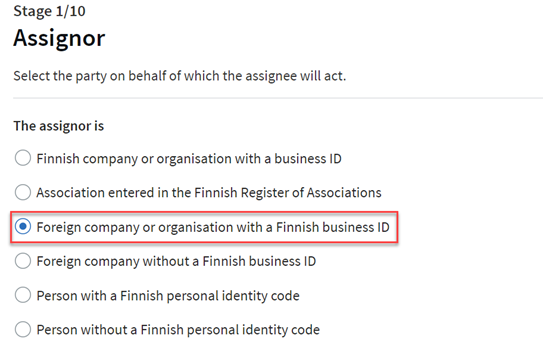
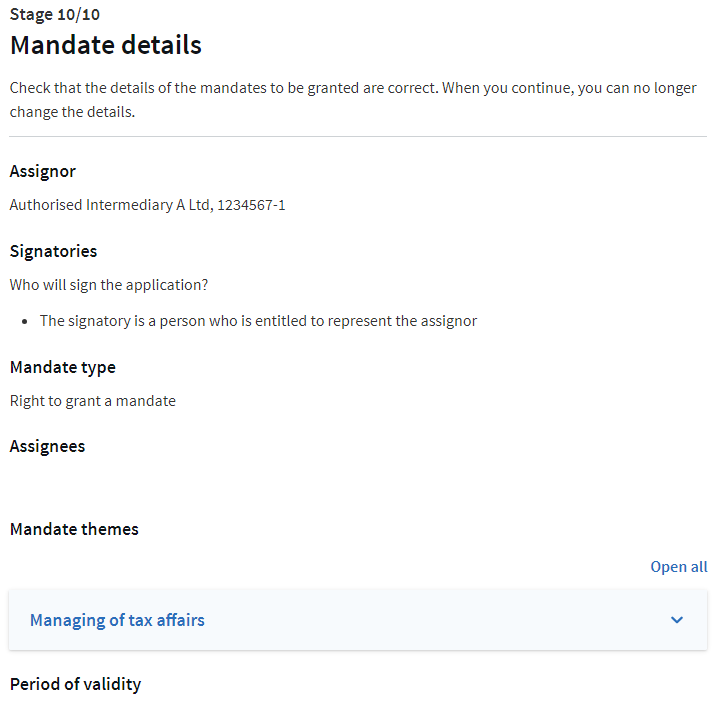
Select Foreign company or organisation with a Finnish Business ID as the party on behalf of which the assignee will act.
-
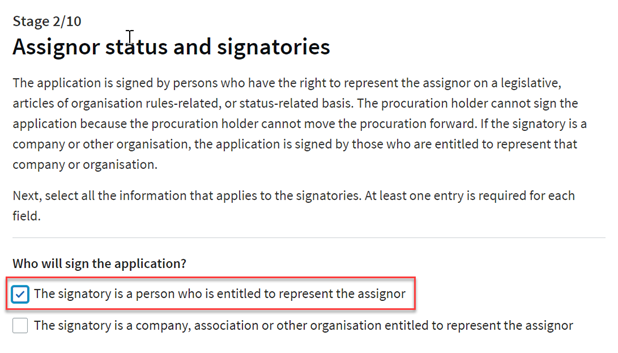
Select The signatory is a person who is entitled to represent the assignor to sign the application.
-
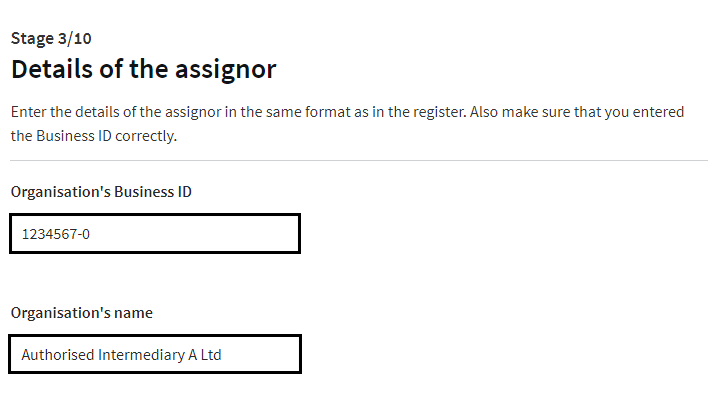
Enter details of the assignor: Authorised intermediary's Business ID as the Organisation's Business ID and authorised intermediary's name as the Organisation's name.
-
Select Right to grant a mandate as the mandate type.
-
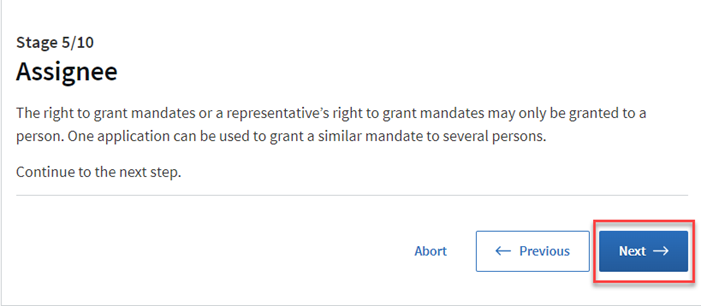
Continue to the next step.
-
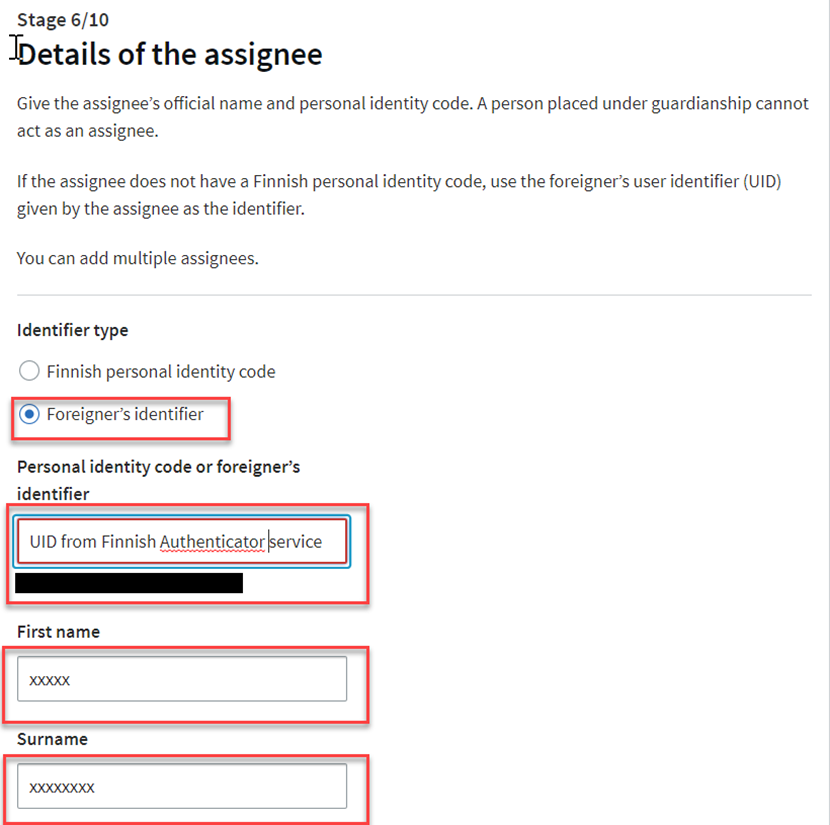
Fill in your details if you are the assignee (the person who manages the company's mandates). Select Foreigner's identifier as the identifier type.
-
Select the mandate themes for which you will grant the right to act on behalf of the assignor. Filter the list with words "Managing of" and choose Managing of tax affairs.
-
Jump over the stage Authorisation specifier.
-
Choose the validity for the mandate. Note that the mandate is valid minimum 1 day and maximum for three years.
-
Check that the details of the mandates to be granted are correct. Then:
- Fill in the required information
- Print out and sign the application
- Attach the required documents:
- certified power of attorney
- certified copy of the passport of the person who has power of attorney to sign application to register an electronic power of attorney in Suomi.fi e-authorisation register,
- the original and official extract from the register, signed and stamped by the authority in the company's or the organisation's home country that proves the signatories' right to sign on behalf of the company



4
Send the application
Send the application with attached documents.
Application with regular mail:
Digital and Population Data Service Agency
P.O. Box 1003
FI-00531 Helsinki
Finland
Application with a courier (like DHL or UPS):
Digital and Population Data Service Agency
Valtuushakemukset / Mandate applications
Lintulahdenkuja 2 D, 2. floor
00530 Helsinki
Finland
5
Give mandate for transactions in Suomi.fi e-Authorizations service
After receiving information by e-mail that the application has been processed, the person to whom the Right to grant a mandate has been registered needs to log into Suomi.fi e-Authorizations and give Mandate for transactions to those persons who will log in to MyTax. Note that these persons need the foreigner’s identifier (UID) if they don´t have a Finnish means of identification. Read more about the foreigner's identifier (suomi.fi).
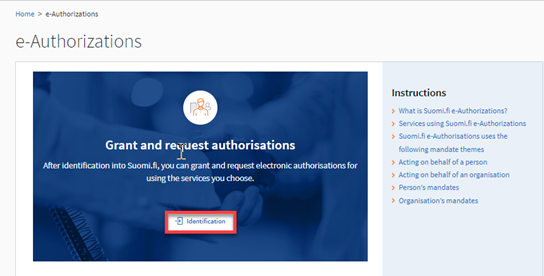
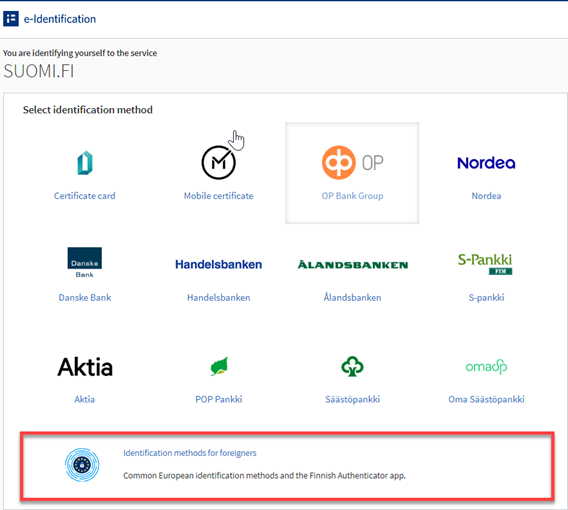
When you want to grant an organisation’s mandates in Suomi.fi e-Authorizations, follow the steps below:
-
Select Identification methods for foreigners (e.g. the Finnish Authenticator app).
-
Select Company’s mandates as the service role.
-
Select the organisation on whose behalf you want to grant a mandate (the authorised intermediary´s Finnish business ID).
-
Select Grant mandates.
There are five steps to granting a mandate:
Step 1: Selection of the mandate type
Select Mandate for transactions.
Step 2: Choice of parties
Select Grant a mandate to a person.
If the person does not have a Finnish personal identity code, you will need their foreigner’s user identifier (UID).
Step 3: Selecting mandate themes
Select Managing of tax affairs as mandate theme.
Step 4: Specifying the period of validity
A mandate must always have a start and end date. The mandate may be valid for a maximum of 25 years from the day on which it was granted. Note that if the assignee’s identifier is the foreigner’s user identifier (UID), the mandate will be valid for no more than 3 years.
Step 5: Mandate validation
Check mandate details:
- The assignor is a company (authorised intermediary´s business ID)
- The assignee is a person that can act on behalf of the authorised intermediary
- The mandate type is Mandate for transactions
- The mandate theme is Managing of tax affairs
- The selected period of validity of the mandate is correct
If you wish to change the details before the mandate is validated, you can go back over these steps.
The mandate you have granted becomes valid from its start date once you have validated it.
Read more about how a representative of an organisation grants mandates alone (suomi.fi).
6
Log in to MyTax
Once you have the mandate for transactions in MyTax, you can log in to MyTax (link opens in a new tab).
Read more about how to find functions relevant to Authorised Intermediaries in MyTax.